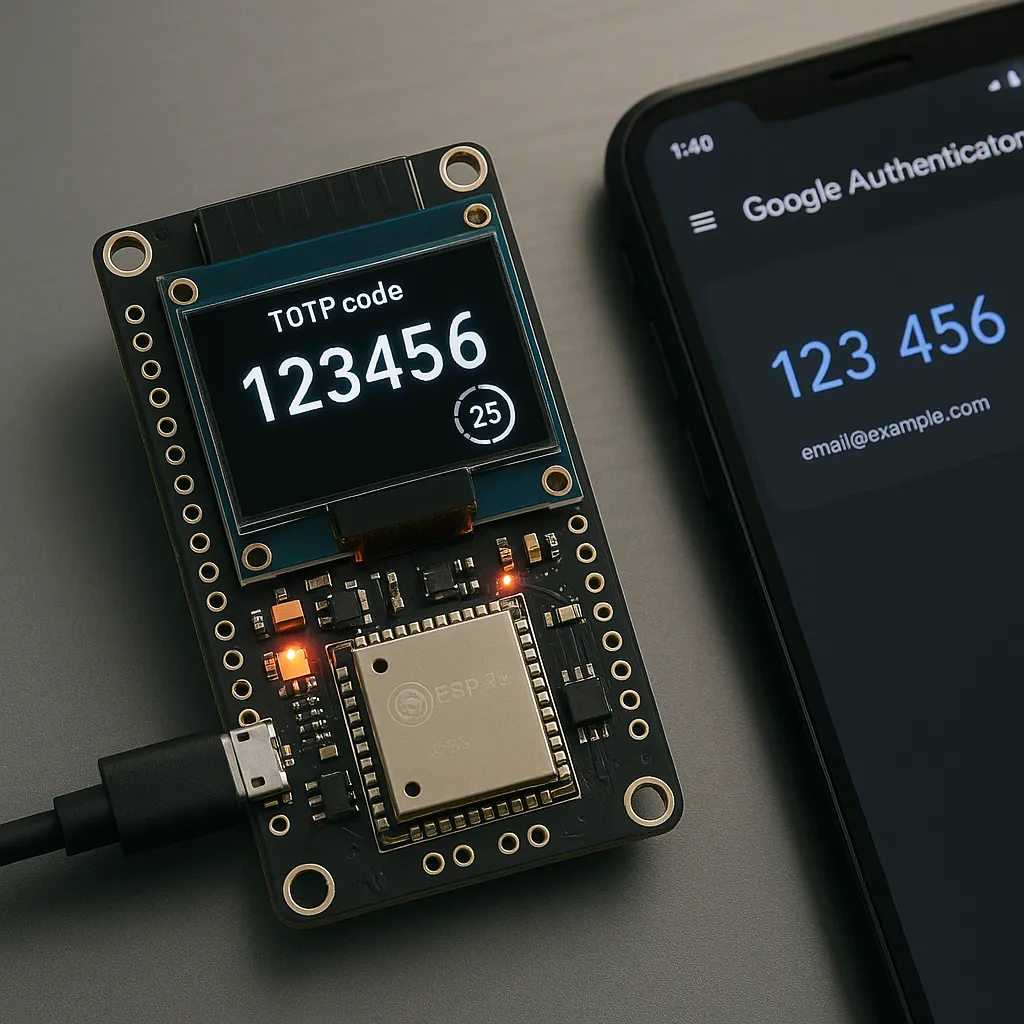
Construyendo un Autenticador TOTP con ESP32
🎯 ¿Qué es TOTP?
TOTP (Time-based One-Time Password) es un algoritmo definido en el RFC 6238 que genera códigos de un solo uso basados en el tiempo actual. Es la tecnología detrás de la mayoría de sistemas de autenticación de dos factores (2FA).
¿Cómo funciona?
- Secret compartido: Cuando activas 2FA en un servicio, recibes un “secret” único (generalmente en formato Base32)
- Timestamp: Se usa la hora Unix actual dividida en intervalos de 30 segundos
- HMAC-SHA1: Se calcula un hash usando el secret y el timestamp
- Truncamiento dinámico: Se extrae un código de 6-8 dígitos del hash
El proceso matemático simplificado:
timestamp = unix_time / 30
hash = HMAC-SHA1(secret, timestamp)
code = hash[offset:offset+4] % 10^6
🔧 Hardware Utilizado
- ESP32-WROVER-DEV (Freenove)
- Cámara OV2640 (para futuras funcionalidades de escaneo QR)
- Conexión WiFi 2.4GHz
📐 Arquitectura del Sistema
El proyecto está dividido en módulos bien definidos:
├── hardware/        # Gestión de WiFi, I2C, periféricos
├── network/         # Servidor HTTP y API REST
├── storage/         # Persistencia en NVS Flash
├── totp/           # Motor TOTP, parser, almacenamiento
└── utils/          # Base32, NTP, helpers
🚀 Implementación Paso a Paso
1. Sincronización de Tiempo con NTP
El componente más crítico de TOTP es tener la hora exacta. Un desfase de segundos hace que los códigos sean inválidos.
// utils/ntp.c
void ntp_sync(void) {
    ESP_LOGI(TAG, "Sincronizando con NTP");

    // Configurar modo de sincronización
    sntp_set_sync_mode(SNTP_SYNC_MODE_IMMED);

    // Servidor NTP
    esp_sntp_setoperatingmode(SNTP_OPMODE_POLL);
    esp_sntp_setservername(0, "pool.ntp.org");

    esp_sntp_init();

    // Esperar sincronización
    int retry = 0;
    while (sntp_get_sync_status() == SNTP_SYNC_STATUS_RESET &&
           retry < 20) {
        vTaskDelay(500 / portTICK_PERIOD_MS);
        retry++;
    }

    if (sntp_get_sync_status() == SNTP_SYNC_STATUS_COMPLETED) {
        ESP_LOGI(TAG, "Tiempo sincronizado!");

        // Mostrar hora actual
        time_t now;
        time(&now);
        ESP_LOGI(TAG, "Hora actual: %s", ctime(&now));
    }
}Importante: La sincronización NTP debe hacerse después de conectar al WiFi y antes de generar códigos TOTP.
2. Decodificador Base32
Los secrets TOTP vienen codificados en Base32. Necesitamos decodificarlos a bytes antes de usarlos.
// utils/base32.c
int base32_decode(const char *encoded, uint8_t *decoded, size_t decoded_len) {
    size_t encoded_len = strlen(encoded);
    size_t decoded_idx = 0;
    uint32_t buffer = 0;
    int bits_in_buffer = 0;

    for (size_t i = 0; i < encoded_len; i++) {
        char c = toupper(encoded[i]);

        // Skip padding y espacios
        if (c == '=' || c == ' ' || c == '\n') continue;

        int value = base32_char_to_value(c);
        if (value < 0) return -1;

        buffer = (buffer << 5) | value;
        bits_in_buffer += 5;

        if (bits_in_buffer >= 8) {
            decoded[decoded_idx++] = (buffer >> (bits_in_buffer - 8)) & 0xFF;
            bits_in_buffer -= 8;
        }
    }

    return decoded_idx;
}
3. Motor TOTP - El Corazón del Sistema
La implementación del algoritmo TOTP usando mbedtls para HMAC-SHA1:
// totp/totp_engine.c
esp_err_t totp_generate_code(const char *secret_b32,
                             uint32_t time_step,
                             uint8_t digits,
                             uint32_t *code) {
    // 1. Decodificar secret Base32
    uint8_t secret[128];
    int secret_len = base32_decode(secret_b32, secret, sizeof(secret));

    // 2. Obtener contador de tiempo
    uint64_t timestamp = get_timestamp();
    uint64_t counter = timestamp / time_step;  // Intervalos de 30s

    // 3. Convertir contador a bytes big-endian
    uint8_t counter_bytes[8];
    for (int i = 7; i >= 0; i--) {
        counter_bytes[i] = counter & 0xFF;
        counter >>= 8;
    }

    // 4. Calcular HMAC-SHA1
    uint8_t hmac[20];
    const mbedtls_md_info_t *md_info =
        mbedtls_md_info_from_type(MBEDTLS_MD_SHA1);
    mbedtls_md_hmac(md_info, secret, secret_len,
                    counter_bytes, 8, hmac);

    // 5. Truncamiento dinámico (RFC 4226)
    int offset = hmac[19] & 0x0F;
    uint32_t binary =
        ((hmac[offset] & 0x7F) << 24) |
        ((hmac[offset + 1] & 0xFF) << 16) |
        ((hmac[offset + 2] & 0xFF) << 8) |
        (hmac[offset + 3] & 0xFF);

    // 6. Generar código de N dígitos
    uint32_t modulo = 1;
    for (int i = 0; i < digits; i++) {
        modulo *= 10;
    }
    *code = binary % modulo;

    return ESP_OK;
}
4. Parser de URIs otpauth://
Los servicios 2FA generan URIs en formato estándar:
otpauth://totp/GitHub:user@email.com?secret=JBSWY3DPEHPK3PXP&issuer=GitHub&digits=6&period=30Nuestro parser extrae toda esta información:
// totp/totp_parser.c
esp_err_t totp_parse_uri(const char *uri, totp_service_t *service) {
    // Validar prefijo
    if (strncmp(uri, "otpauth://totp/", 15) != 0) {
        return ESP_ERR_INVALID_ARG;
    }

    // Extraer label (Issuer:account)
    const char *path = uri + 15;
    const char *query = strchr(path, '?');

    // Parsear label decodificando URL
    char decoded_label[128];
    url_decode(decoded_label, path);

    // Separar issuer y account si hay ":"
    char *colon = strchr(decoded_label, ':');
    if (colon != NULL) {
        *colon = '\0';
        strncpy(service->issuer, decoded_label, MAX_ISSUER_LEN - 1);
        strncpy(service->account, colon + 1, MAX_ACCOUNT_NAME_LEN - 1);
    }

    // Extraer parámetros: secret, issuer, digits, period
    get_query_param(query, "secret", service->secret, MAX_SECRET_LEN);
    get_query_param(query, "issuer", service->issuer, MAX_ISSUER_LEN);

    // Valores por defecto
    service->digits = 6;
    service->period = 30;

    return ESP_OK;
}
5. Almacenamiento Persistente en NVS
Los servicios se guardan en la partición NVS Flash del ESP32:
// totp/totp_storage.c
esp_err_t totp_storage_add(const totp_service_t *service) {
    // Agregar al cache en memoria
    memcpy(&services[service_count], service, sizeof(totp_service_t));
    service_count++;

    // Guardar en NVS
    nvs_handle_t handle;
    nvs_open("totp_storage", NVS_READWRITE, &handle);

    // Guardar contador
    nvs_set_u8(handle, "svc_count", service_count);

    // Guardar cada servicio
    char key[16];
    for (int i = 0; i < service_count; i++) {
        snprintf(key, sizeof(key), "svc_%d", i);
        nvs_set_blob(handle, key, &services[i], sizeof(totp_service_t));
    }

    nvs_commit(handle);
    nvs_close(handle);

    return ESP_OK;
}
6. Interfaz Web Moderna
La interfaz está construida como una SPA (Single Page Application) embebida en el ESP32:
<!-- network/www/index.html -->
<div class="container">
    <h1>🔐 ESP32 TOTP</h1>

    <!-- Formulario para agregar servicios -->
    <div class="card">
        <input id="uri-input"
               placeholder="otpauth://totp/Service:user@email.com?secret=...">
        <button onclick="addService()">Agregar</button>
    </div>

    <!-- Lista de servicios -->
    <div id="services-list"></div>

    <!-- Vista de código -->
    <div class="code-display" id="code-value">------</div>
    <div class="progress-bar">
        <div class="progress-fill" id="progress"></div>
    </div>
</div>

<script>
async function addService() {
    const uri = document.getElementById('uri-input').value;

    const response = await fetch('/api/services', {
        method: 'POST',
        headers: { 'Content-Type': 'application/json' },
        body: JSON.stringify({ uri: uri })
    });

    if (response.ok) {
        loadServices();
    }
}

async function updateCode() {
    const response = await fetch(`/api/code/${currentIndex}`);
    const data = await response.json();

    document.getElementById('code-value').textContent =
        data.code.toString().padStart(6, '0');

    const progress = (data.remaining / 30) * 100;
    document.getElementById('progress').style.width = progress + '%';
}

setInterval(updateCode, 1000);
</script>
7. API REST
El servidor HTTP expone endpoints RESTful:
// network/server.c

// GET /api/services - Listar servicios
static esp_err_t api_services_get_handler(httpd_req_t *req) {
    char *json = totp_storage_list_json();
    httpd_resp_set_type(req, "application/json");
    httpd_resp_send(req, json, HTTPD_RESP_USE_STRLEN);
    free(json);
    return ESP_OK;
}

// POST /api/services - Agregar servicio
static esp_err_t api_services_post_handler(httpd_req_t *req) {
    char *buf = malloc(512);
    httpd_req_recv(req, buf, 512);

    cJSON *root = cJSON_Parse(buf);
    const char *uri = cJSON_GetObjectItem(root, "uri")->valuestring;

    totp_service_t service;
    totp_parse_uri(uri, &service);
    totp_storage_add(&service);

    cJSON_Delete(root);
    free(buf);

    httpd_resp_send(req, "{\"success\":true}", HTTPD_RESP_USE_STRLEN);
    return ESP_OK;
}

// GET /api/code/{index} - Obtener código TOTP
static esp_err_t api_code_get_handler(httpd_req_t *req) {
    int index = atoi(strrchr(req->uri, '/') + 1);

    totp_service_t service;
    totp_storage_get(index, &service);

    uint32_t code;
    totp_get_code(service.secret, service.digits, &code);
    uint32_t remaining = totp_get_remaining_seconds(service.period);

    char response[256];
    snprintf(response, sizeof(response),
        "{\"code\":%lu,\"remaining\":%lu,\"service\":\"%s\"}",
        code, remaining, service.issuer);

    httpd_resp_send(req, response, HTTPD_RESP_USE_STRLEN);
    return ESP_OK;
}
🔒 Seguridad y Consideraciones
Ventajas
- ✅ Genera códigos idénticos a Google Authenticator
- ✅ Persistencia - los servicios sobreviven a reinicios
- ✅ Código abierto - puedes auditar toda la seguridad
Limitaciones
- ⚠️ Secrets guardados en NVS sin cifrado adicional
- ⚠️ Red WiFi debe ser segura
- ⚠️ No tiene autenticación en la interfaz web
- ⚠️ Reloj depende de sincronización NTP
Mejoras Futuras
- 🔄 Cifrado de secrets usando secure boot
- 🔄 Autenticación web con login/password
- 🔄 Backup/restore de servicios
- 🔄 Escaneo de códigos QR con cámara
- 🔄 Display físico para uso sin WiFi
📊 Rendimiento
- Generación de código: ~5ms
- Uso de RAM: ~40KB
- Flash ocupado: ~830KB
- Capacidad: hasta 20 servicios
🧪 Probándolo
Para probar con un servicio real:
- Ve a GitHub → Settings → Security → 2FA
- Selecciona “Configurar manualmente”
- Copia la URI completa:
otpauth://totp/GitHub:user@... - Pégala en la interfaz del ESP32
- Compara el código generado con Google Authenticator
¡Deberían ser idénticos!
💻 Código Fuente
El proyecto completo está disponible en GitHub:
👉 https://github.com/ggenzone/maker/esp32/05-TOTP
🎓 Lo Aprendido
Este proyecto me enseñó sobre:
- Criptografía práctica: HMAC, hashing, códigos de un solo uso
- Protocolos estándar: RFC 6238, RFC 4226
- Tiempo real en embedded: Sincronización NTP, timestamps
- Persistencia en flash: Uso de NVS en ESP32
- Desarrollo web embebido: Server HTTP, APIs REST, SPAs
- Debugging complejo: Códigos incorrectos por timezone o desfase de reloj